Mostrando postagens com marcador FME. Mostrar todas as postagens

terça-feira, 10 de outubro de 2017

Generating Heatmap using FME

In this topic I describe how can use the Software FME to connect in the API from Strava and generate a Heatmap.

Last week I posted on twitter a short video demonstrating the heatmap generation using FME:


 The figure bellow shows this process:

Scenario:

 After a hard day of work, nothing better than running out.

 To monitor my Run i use the app from Strava. This app monitors the route by storing the informations: latitude and longitude, time, date, elevation, distance in KM, average speed, etc.

Once i finish my activity, the app salved my informations and this activity has a ID.

And now, how can i read the information my activity???

Do not P-A-N-I-C!

The Strava has a rich and documented API that enables us to access your activity.

To request your data using the API you need a access_token , that is possible to be obtained in Strava API Reference

https://strava.github.io/api/#access


The next Step it's in Software FME Desktop.

We build a Workspace to prepare to read the data originated by Strava and generate a Heatmap in python language.


Main points in Workspace:


  1. Use the transformer Creator to start your Workspace
  2. The  transformer HttpCaller is responsible to makes request to API Strava, using a URL and return in JSON all information your activitie respecting the id_activity amd access_token : https://www.strava.com/api/v3/activities/id_activity/streams/time,latlng,distance,altitude?access_token=xxxxxxxxxxxxxxxxxx.
Example JSON:


      3. Extract the informations lat and long from JSON and configure the transformer PytonCaller to receive these informations and generate the Heatmap.

      First we need to install a free library Heatmap into folder to site - packages in FME:

                                       fmepython27\lib\site-packages

     Installing the library heatmap using your IDE. I used the Pycharm to test this:

                                                        pip install heatmap

  Another action important to do is import a library responsible to work with different image file formats, the library PIL in the same folder to site - packages in FME.

                                                       pip install Pillow

    4. PythonCaller = Where the Magic happens
        
         Generating Heatmap:
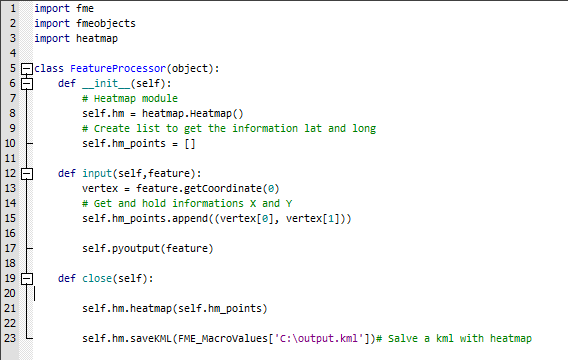


     This sript in Python generate a KML with Heatmap and you can extract from this KML the Heatmap created


Conclusion: You can explore all possibilites with python using the transformers PytonCaller and PythonCreator.


See you on the next Post :)


domingo, 2 de julho de 2017

FME Objects API for Raster using Python

Hi all FME User's,

In this Year the FME Desktop bringt the new API for Raster using Python. Its possible to make any actions, for example: create a mosaic, make Clipper, extract informations Bounding Box from Raster file, remove Band, etc...


Inside FME Core has transformer to do theses actions, but if you are a Pythonics like me :) you can create scripts language in Python.

I created a Workspace that demonstrate a just Clipper using only Python Script.

The source data is a Raster file and the transformer AttributeCreator  is configurated  parameter the Bounding Box informations : XMin,yMin,XMax and yMax.


Continuing we have the transformer PythonCaller. A PythonCode was written to receive the information Bounding Box and make a just simple Clipper action.

The class responsible to performs a clipper on raster file is FMERasterTools.

Has a important documentation online to understand better the use API for Raster File:

https://docs.safe.com/fme/html/FME_Objects_Python_API/index.html

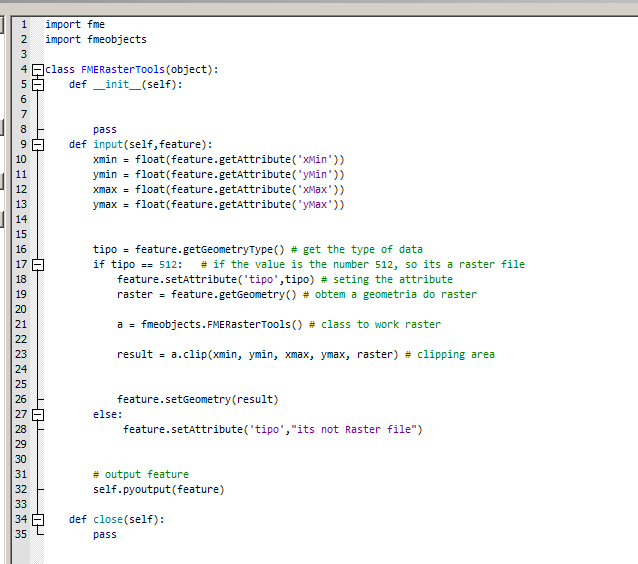
I entered below the Python Code with comments:


How you can see above, on the line 17 I check the geometry source data if is a Raster file ( if tipo == 512 ). If the transformer PythonCaller receive another geometry instead Raster file, the information will be show in Attribute tipo ( line 28 ).

And the line 23 the action Clipper was configurated with simple line code:


Now, everybody can program use the API for Raster using Python. Access the documentation and play with Python and transformers. :)

If anyone has any doubt, please contact me that i will help.

See you the next Post.


domingo, 16 de abril de 2017

Introduction to the Blog


Hello everyone! :)


I'm very excited with the creation of this Blog.


For a special reason: to share with all my experiences of the subjects that i like and work, for example:

  • GIS
  • ETL
  • Maps
  • Validation
  • Intergration
  • IoT
  • Python
  • Cloud Comunication and more...

So, Who am I? ??

My name is Danilo de Lima, I'm a Spatial ETL Analyst and work with software ETL - FME ( provided by SAFE Software www.safe.com ).

Through the use of the software FME, I got a experience using a datatypes like: Raster, Lidar, XML, Json, vector data, Notifications Service, Python Language, and so...

Certifications: FME Professional and Trainer.


And now? - I want to publish  subject every two weeks, so Stay Tuned!